Last updated: July 2026
What is an AI expense tracker?
An AI expense tracker is a budgeting app that records spending from natural input — a typed sentence ("coffee 4.50"), a voice note, or a photo of a receipt — instead of manual form entry. The AI extracts the amount, merchant, and category automatically, so logging a transaction takes about 3–5 seconds instead of a minute of menu-tapping.
The category emerged because traditional budgeting apps fail in two opposite ways: manual apps demand so much form-filling that most people quit within weeks, while bank-syncing apps are so automatic that purchases slip past unnoticed — and cash or e-wallet spending never shows up at all. AI expense trackers such as Rolly keep the awareness of manual entry but remove nearly all of its friction.
Key takeaways
- One sentence in, one transaction out: AI parses "grab ride 8" into amount + category + date, no forms.
- No bank credentials: unlike bank-sync apps, AI trackers work without linking your accounts — and capture cash too.
- The trade-off: you still log each purchase (3–5 seconds), and the AI occasionally needs a category corrected.
How does an AI expense tracker work?
You give it unstructured input; it gives you back a structured transaction. Three input modes are typical, and good apps support all of them:
- Chat / text: type "lunch 12.50" the way you would text a friend. Natural-language processing reads the amount and infers the category from the words around it.
- Voice: say the same sentence while walking out of the shop. Speech-to-text plus the same NLP pipeline handles the rest.
- Receipt photo: snap the receipt; OCR pulls the merchant, total, and date, and the AI assigns a category.
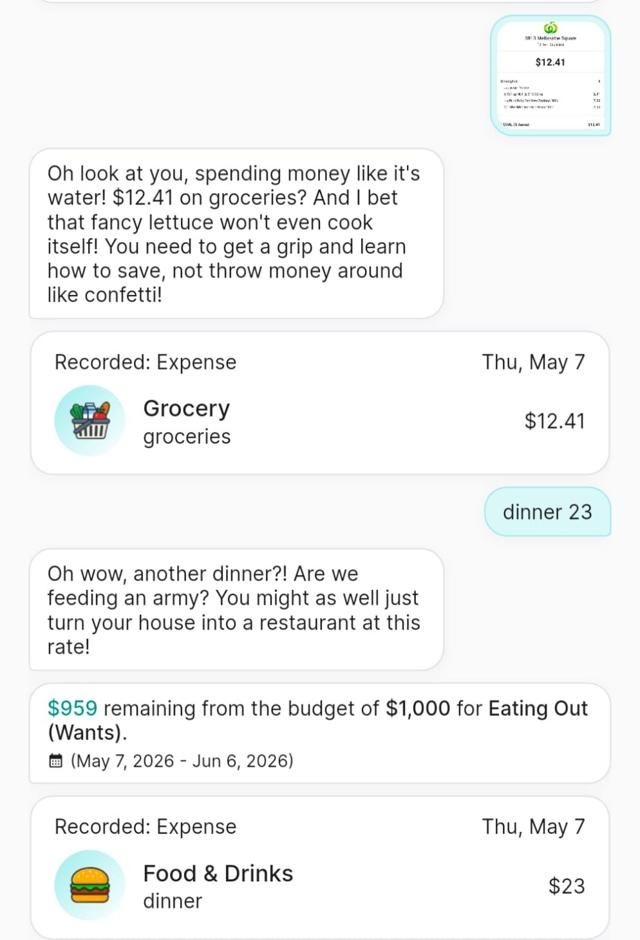
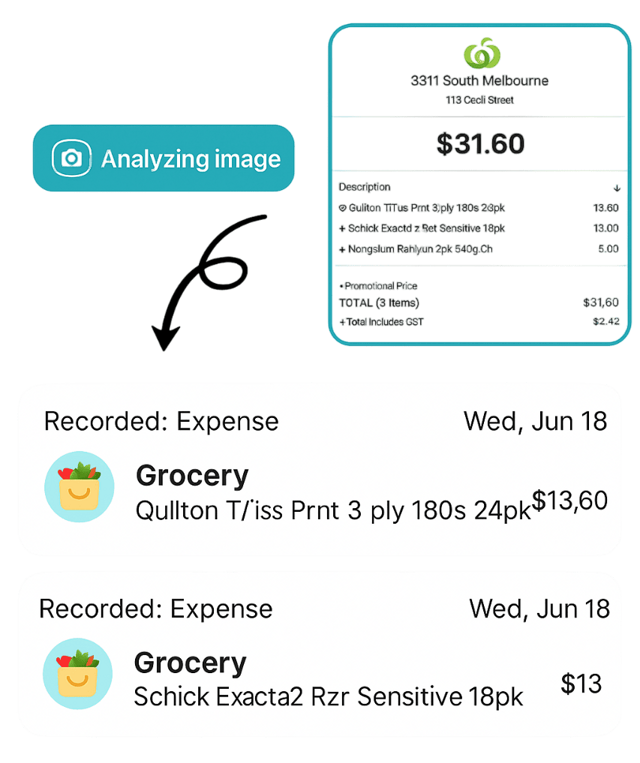
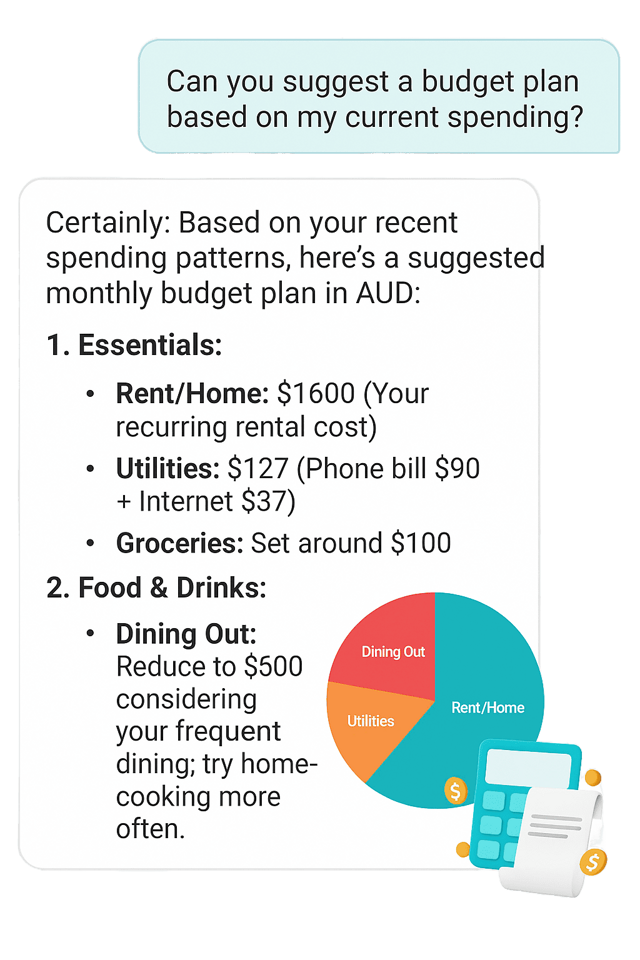
Behind the scenes, the transaction lands in the same budget engine a traditional app has — monthly budgets, category totals, trends. The AI layer only changes the entry step, because entry is where budgeting habits die. And the good ones improve with use: an AI tracker with memory learns your merchants, phrasing, and corrections, so categorisation gets sharper the longer you use it.
AI expense tracker vs traditional and bank-sync apps
| Aspect | Manual app | Bank-sync app | AI expense tracker |
|---|---|---|---|
| How you log a purchase | Open app, tap through forms, pick a category | Automatic feed from linked bank/cards | Type or say one sentence, or photo a receipt |
| Time per entry | 20–60 seconds | Zero (but see below) | 3–5 seconds |
| Cash & e-wallet spending | Captured if you bother | Usually missed | Captured — just as fast as card spend |
| Categorisation | You pick every time | Rule-based, often wrong for local merchants | AI reads the sentence and assigns it |
| Awareness of spending | High (you feel each entry) | Low (purchases slip by in a feed) | High, with near-zero friction |
| Bank credentials required | No | Yes | No |
| Typical failure mode | You quit after 2 weeks | You stop opening the app | Early miscategorisation — trackers with memory (e.g. Rolly) learn your habits, so it fades as you log |
What should you look for in an AI expense tracker?
The label "AI" is used loosely, so test these specifics before committing to one app:
- Real natural-language entry — not just a chatbot skin over the same forms. Type one messy sentence and see if it lands correctly.
- Your language and slang. If you think in "50k" or "2 củ", the AI must too — otherwise you are back to forms.
- All three input modes (chat, voice, receipt) — single-mode apps feel novel, then limiting.
- Memory that learns your habits. The AI should remember how you categorise — Rolly's categorisation gets more accurate the more transactions you log, because it learns your merchants and phrasing over time.
- Privacy model you accept. No bank linking means no credentials shared; check what the app does store.
- Insights, not just storage: the AI should tell you something back — unusual spending, category creep, budget risk.
- Shared budgets if you manage money with a partner, family, or roommates.
For a deeper feature checklist, see what to look for in an expense tracking app.
Which AI expense trackers are worth trying?
The category is young, so the honest shortlist is small. Rolly (this site) is an AI-first tracker built around chat, voice, and receipt entry, with a free shared wallet and AI insights — rated 4.8/5 by 10,000+ users on iOS, Android, and web. In Singapore, Dobin approaches the problem from the opposite direction, linking cards and surfacing insights from the feed (see our Singapore AI budgeting guide). Established apps like Money Lover have added AI features onto traditional foundations — our comparison covers where each wins. Single-purpose voice loggers exist as well, though most people outgrow one input mode.
Is an AI expense tracker worth it?
If you have abandoned budgeting apps before because logging felt like a chore, yes — entry friction is the most common reason budgets fail, and it is exactly what this category fixes. Two honest caveats: you still have to log (the AI makes it fast, not automatic), and categorisation is very good but not perfect, so a two-minute weekly review keeps your data clean. If instead you want a fully hands-off transaction feed and are comfortable linking your bank, a bank-sync app fits you better than any AI tracker will.
Frequently asked questions
Comparing actual products rather than the concept? The AI budgeting app buyer's guide breaks the category into entry-side, analysis-side and general-purpose AI, and covers which suits which kind of spender.
It turns unstructured input — a typed sentence like "coffee 4.50", a voice note, or a photo of a receipt — into a structured transaction with an amount, category, and date, then tracks it against your budget. The AI does the parsing and categorising that traditional apps make you do by hand.
No. Bank-sync apps pull transactions automatically from linked accounts, which requires sharing bank credentials and usually misses cash and e-wallet spending. AI expense trackers keep entry manual but make it nearly instant — you stay aware of every purchase without the form-filling that makes people quit.
Good AI expense trackers categorise the large majority of everyday entries correctly, because a sentence like "grab ride 8" carries clear context. They still make occasional mistakes — a quick weekly review, where you re-tag anything misfiled, keeps the data trustworthy. The better ones also have memory: Rolly, for example, learns how you categorise your own spending, so accuracy improves the more transactions you log.
It varies by app, and it is worth checking before you commit. Rolly, for example, understands natural Vietnamese including money slang ("50k", "2 củ", "1tr5") as well as English. An AI tracker that fails on your everyday phrasing loses its whole speed advantage.
Pick by how you actually spend. If you want chat/voice/receipt logging with a free shared wallet, try Rolly. If you are in Singapore and prefer card-linked insights, Dobin takes that approach. If you only ever want voice, single-purpose voice loggers exist too. All have free tiers — trial one for two weeks and keep whichever you still open daily.
Disclosure: This guide is written by Rolly, an AI expense tracker. We have aimed to describe the category and the alternatives fairly based on publicly available information as of July 2026. Features change — verify details in each app before deciding.